





Developer settings
To use developer settings, go to Settings > Reading & Conversations > Behavior > Advanced and turn on Developer Mode. The Developer tab will then show under Settings > Help > Developer.
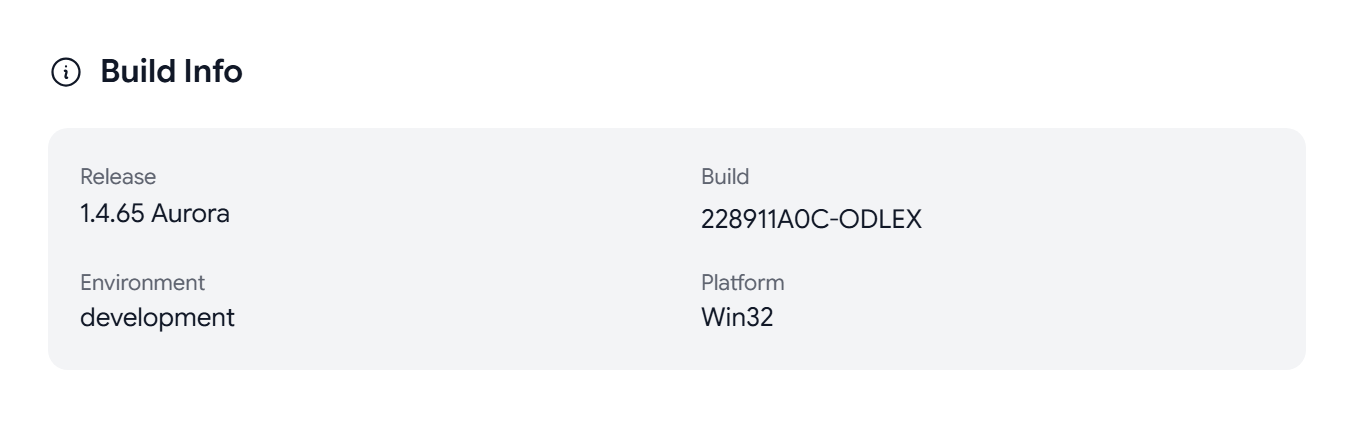
To hide the tab again, turn off Developer Mode.
What the Developer tab shows
- Build Info. The Release, Build, Environment, and Platform.
- Cryptographic Status. Whether your Vault is loaded and your Passphrase is cached, your Key Age and Fingerprint, whether your key is on WKD and the Keyserver, and the algorithms that Aster uses.
- Session & Account. Your User ID, Session Duration, and User Agent.
- Email Statistics. Message counts for each folder, and your storage use.
- Performance. Page Load, DOM Ready, JS Heap, Screen, and Viewport.
- Network. Online or Offline, and your Connection, Speed, and Latency if your browser reports them.
- Storage. The Service Worker, and what Aster stores in LocalStorage, SessionStorage, and IndexedDB.
You can select a value, such as your fingerprint, to copy it.
Export a debug report
Select Export Debug Report to download a JSON file with the app version, encryption status, network, performance, storage, and display details. It does not include your messages, contacts, or keys. If Aster support asks you for a debug report, attach this file to your request.
Clear the cache
- Refresh Crypto Status checks your encryption status again.
- Force Reload reloads Aster Mail.
- Unregister Service Workers removes Aster’s offline service worker. You should use it if the app keeps loading an old version.
- Clear All Cache & Reload clears the data cached on this device. You might have to sign in again, but your mail stays on the server and is not deleted.
On a phone
In the mobile web app, the same controls sit under Settings > About.
- Go to Settings > About.
- Tap Build five times. After the third tap, a message counts down the taps left, and then Aster Mail shows “Developer mode enabled”.
A Developer group then appears with your User ID, Platform, Viewport, Screen, User Agent, and Storage Keys, along with Force Reload, Unregister Service Workers, Clear All Cache & Reload, and Disable Developer Mode.
API keys
Aster Mail does not offer API keys for its own API. To send mail from a script or an app, use an SMTP token. See How to download and set up Aster Bridge.
Related articles
Was this article helpful?